This is in no way a science or guarantee; it's simply a few suggestions with which many bloggers have found success.
Set your blog to Send Pings. When this setting is activated, your blog will be included in various "recently updated" lists on the web as well as other blog-related services.
Activate Your Navbar. Do this and you might start to see the effects right away! One of the features on the Blogger Navbar is a button called NextBlog - click it to visit the next Navbar-enabled blog.
Install Email This Post. If you use Email This Post on your blog, people will be able to forward your posts to friends. This may not have an immediate impact on your site stats but it enables others to publicize your blog for you.
Turn on Post Pages. By publishing every post as its very own web page with Post Pages, you ensure that your entries are way more link-able and more attractive to search engines.
Turn on your site feed. When people subscribe to your site feed in their newsreaders, they're very likely going to read your post.
Add your blog to Blogger's listings. When you add your blog to our listings it shows up in Nextblog, Recently Updated, and other places. It's like opting-in to traffic.
Write quality content and do it well. If your "style" is bad writing, worse grammar, no punctuation, and an ugly design, that might be okay for a niche crowd. But the idea here is to achieve mass appeal, so fix yourself up a bit.
Publish regular updates. Simple: the more you blog, the more traffic you'll get.


 Then click Add Authors:
 Next, type the email addresses of the people you're inviting to the blog, separating each address with a comma. They'll receive an email with a confirmation link soon. Note that they must have Google Accounts, and if they don't already, they'll be prompted to create one.
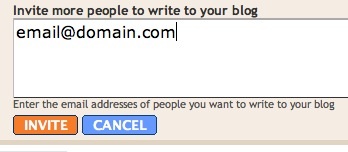 When you're ready to send the invitations, click Invite.